ASO Screenshot Best Practices: 10 Examples
Use a practical checklist for clearer ASO screenshots: first-frame messaging, real UI, visual consistency, localization, and testing.
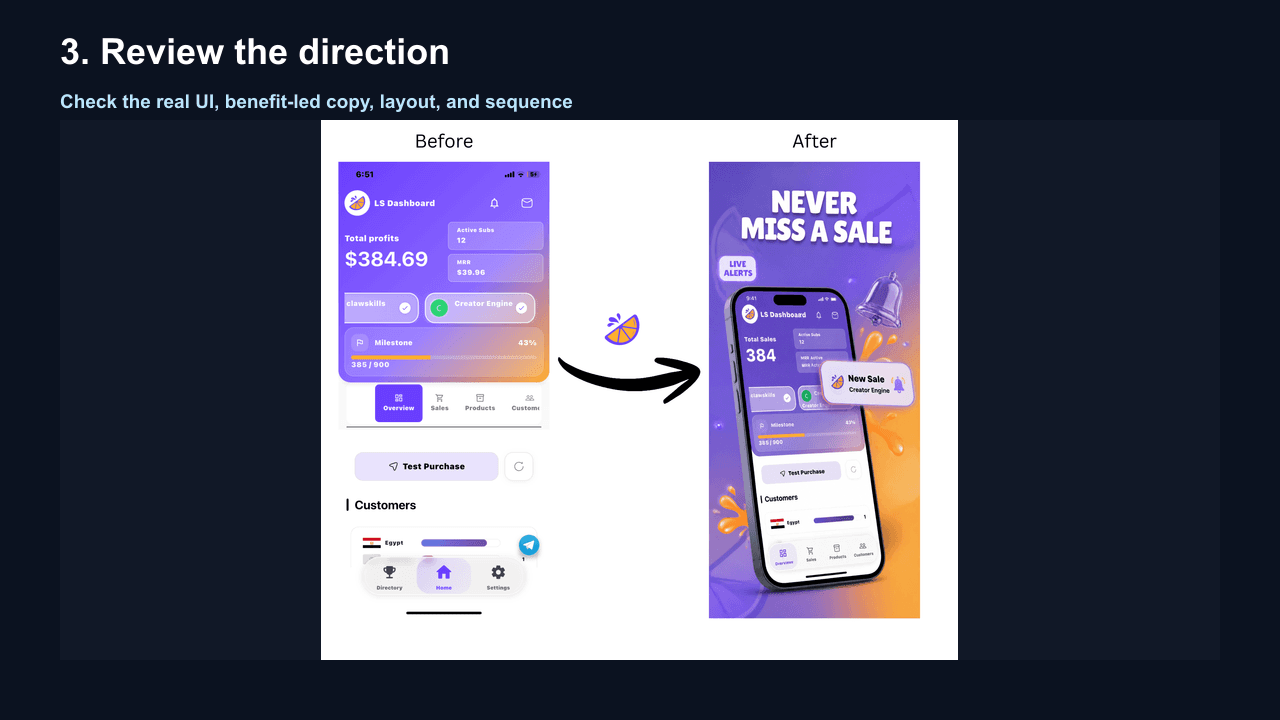
Your app screenshots are a visual explanation of the product. In crowded app stores, a clear sequence can help visitors understand the app before they read the full description. Use the checklist below as a set of hypotheses to test against your own store data.
The Psychology of App Store Screenshots
Visitors scan quickly, so the first screenshot should communicate the product's main benefit immediately. There is no universal time or scroll-through percentage that applies to every category; measure your own listing behavior when the platform provides it.
10 Practical Best Practices
1. Lead With Your Value Proposition
What works: Your first screenshot should answer "What does this app do for me?"
Example:
- ❌ "Welcome to TaskFlow" (wastes space)
- ✅ "Track expenses in 2 taps. No spreadsheets." (clear benefit)
Why it helps: Visitors can understand the product without decoding a generic welcome screen first.
2. Show Real UI, Not Abstract Art
What works: Screenshots that show the actual app interface.
The principle: The screenshots should make the real product experience easy to recognize. Supporting illustration can add context, but it should not hide or misrepresent the UI.
Best approach:
- Use actual app screens
- Add device frames for context (optional but recommended)
- Show the app in its ideal state (populated with sample data)
- Avoid empty states or placeholder content
3. Use All Available Screenshot Slots
The numbers:
- Apple accepts one to ten screenshots per device target.
- Google Play limits and surfaces vary by listing context; verify the current Play Console guidance.
- More screenshots are not automatically better—use distinct frames that add useful information.
Why it matters: More screenshots = more opportunities to communicate value and address objections. Think of it as a landing page-every section matters.
4. Prioritize the First Three Screenshots
Planning insight: Put the strongest value proposition first, then use the next frames to explain the workflow and supporting benefits. Which frames appear in discovery surfaces can vary by store surface and orientation.
The optimal sequence:
- Primary value proposition
- Key differentiator from competitors
- Social proof or second major benefit
Test this: If someone only sees your first three screenshots, would they download?
5. Write Benefit-Driven Headlines
Headline formulas that convert:
- Action-oriented: "Track expenses in 2 taps"
- Benefit-led: "Save 5 hours every week"
- Bold claim: "The #1 finance app for freelancers"
- Problem-solution: "Stop forgetting passwords"
Specifications:
- Keep under 50 characters
- Use large, bold fonts
- Ensure readability at thumbnail size
- Test on actual devices, not just desktop
Testing idea: Benefit-led headlines give you a clear hypothesis to test against feature-led labels. Measure the difference with your own store experiment.
6. Localize for Different Markets
The opportunity: Localized screenshots can make a listing more relevant in non-English markets. The size of the lift depends on category, audience, translation quality, and traffic, so measure the result in each market.
Localization checklist:
- Translate all text
- Adapt cultural references
- Use region-appropriate models/people
- Consider local design preferences
- Test with native speakers
High-priority markets: Japan, South Korea, Germany, France, Brazil
7. Maintain Visual Consistency
What consistency means:
- Same color palette across all screenshots
- Consistent typography hierarchy
- Unified layout structure
- Coordinated background styles
- Matching device frames (if used)
Why it matters: Consistency signals professionalism and makes your app memorable. Inconsistent screenshots suggest a poorly-designed app.
8. Show Progressive Value
The storytelling approach: Arrange screenshots in a logical sequence that walks users through your app's value.
Example sequence for a fitness app:
- Primary benefit: "Lose weight with 15-min workouts"
- The workout experience (show timer, exercises)
- Tracking progress (charts, stats)
- Personalized plans (AI recommendations)
- Community features (social motivation)
6-10: Additional features, integrations, testimonials
9. Optimize for Dark Mode (iOS)
Viewing context: Check the gallery on both light and dark device settings. Your screenshots should remain legible and should accurately reflect the product's supported themes.
Tips:
- Use contrasting colors that pop on dark gray
- Avoid pure black text that disappears
- Test screenshots in App Store with dark mode enabled
- Consider dark mode variants if your app supports it
10. Update Screenshots With Major Releases
The rule: Screenshots should always reflect your current app.
When to update:
- Major UI redesigns
- New core features
- Brand refreshes
- Seasonal campaigns
- Periodic review after meaningful product or positioning changes
Warning: Outdated screenshots are a top reason for negative reviews ("This doesn't look like the app I downloaded!")
Common Mistakes That Weaken Clarity
- Starting with a splash screen or logo-wastes precious first impression
- Showing login or onboarding-users haven't committed yet
- Tiny text-unreadable at actual display size
- Inconsistent aspect ratios-looks amateur
- Too many screenshots of the same feature-repetitive and boring
- Ignoring your category-finance apps should look trustworthy, games should look fun
- No clear call-to-action-tell users what to do next
Real Examples: Before & After
Example 1: Productivity App
Before:
- Logo on gradient background
- Empty task list
- Settings screen
- About page
After:
- "Organize your life in 5 minutes daily" with populated task view
- Smart scheduling feature showing AI recommendations
- Progress dashboard with completed tasks
- Calendar integration showing seamless sync
- Dark mode variant
6-8: Additional features with benefit headlines
Measure: Compare the page-view-to-install result over a defined test window instead of assuming a lift from the visual change.
Example 2: Fitness App
Before: Generic gym photos, no app UI visible
After:
- "Get fit at home. No gym required." with workout in progress
- Personalized workout plan screen
- Exercise demonstration with form tips
- Progress tracking charts
- Nutrition logging feature
- Community challenges
Measure: Compare qualified store traffic and installs over a defined test window.
How to A/B Test Your Screenshots
Option 1: Google Play Experiments (Free)
- Built into Play Console
- Test up to 5 variants
- Run for minimum 7 days
- Measure conversion rate
Option 2: Third-Party Tools
- StoreMaven: Pre-launch testing
- SplitMetrics: Variant testing
- CheckASO: Competitor analysis
Testing best practices:
- Test one variable at a time (headlines OR layout, not both)
- Use a consistent test window and enough traffic for a meaningful comparison
- Document learnings for future updates
- Test seasonally (holidays, back-to-school, New Year)
The WowShots Advantage
Creating a screenshot set manually can take time. With WowShots, you can:
- Upload your app screenshots or paste store URL
- Configure your target audience and headline tone
- Generate a first draft for review
- Iterate quickly to test different approaches
Review each output for UI accuracy, claims, localization, accessibility, dimensions, and current store requirements before publishing.
Take Action
Your screenshots are either converting users or sending them to competitors. Audit your current set against these 10 best practices:
- [ ] First screenshot shows clear value proposition
- [ ] Real app UI visible (not abstract art)
- [ ] Using all available screenshot slots
- [ ] First 3 screenshots tell a complete story
- [ ] Headlines are benefit-driven, not feature labels
- [ ] Visual consistency across all screenshots
- [ ] Screenshots reflect current app version
- [ ] Text is readable on mobile devices
- [ ] Progressive value demonstration
- [ ] Localized for priority markets (if applicable)
Use the checklist to identify the next experiment or revision; do not treat the score as a guaranteed conversion forecast.
Useful WowShots tools
Move from research to production with the tool that matches your next step.