AI App Screenshot Generator: App Store & Google Play
Learn what an AI screenshot generator can do, how to review its output, and how to choose a workflow for App Store and Google Play assets.
Finding the right AI screenshot generator can simplify the first draft of your app store assets. The practical benefit varies with your source screens, creative brief, review process, localization needs, and the number of variants you plan to test.
This guide covers what an AI screenshot generator actually does, how to review generated assets, the main workflow options, and how to choose the right tool for your app.
Quick answer: If you need a first draft from an existing app URL or raw product screenshots, an AI-assisted workflow can reduce setup work. WowShots is built for that App Store and Google Play use case: it combines your product context with screenshot generation, then leaves the claims, copy, dimensions, and final publishing decision for your team to review. Open the AI screenshot generator or keep reading for the evaluation criteria.
What Is an AI Screenshot Generator?
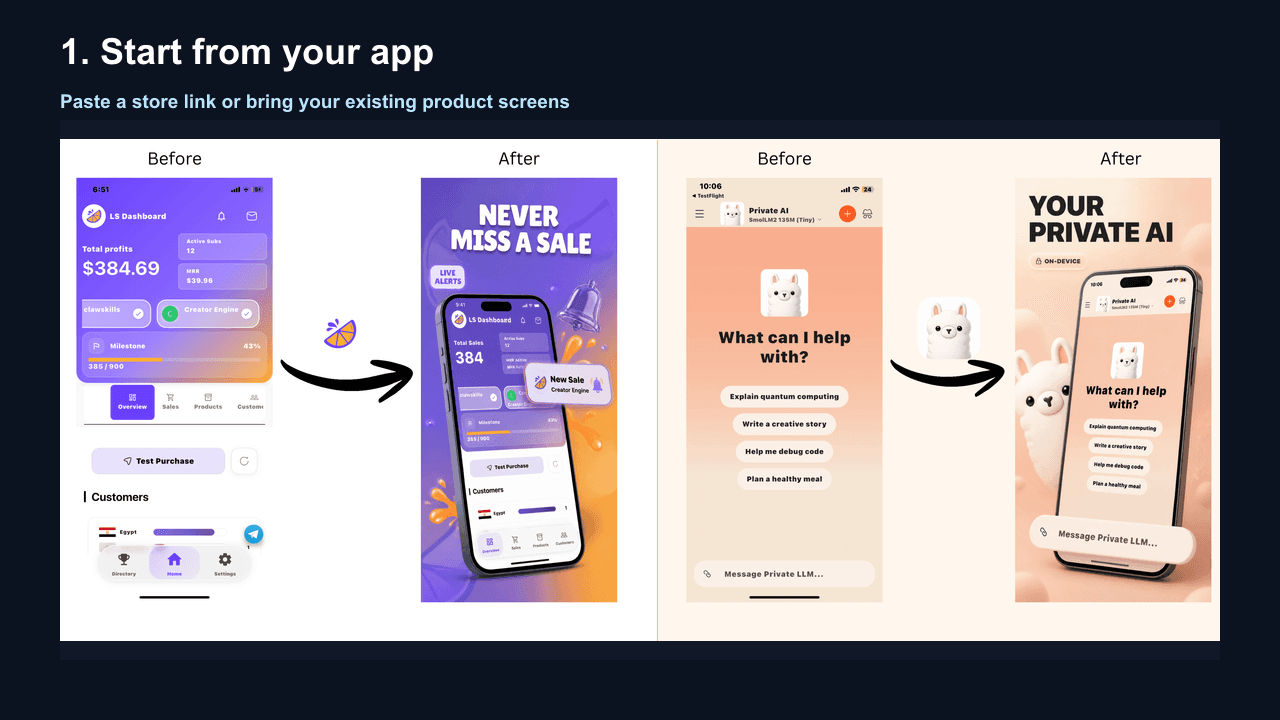
An AI screenshot generator is a tool that uses artificial intelligence to turn raw app screenshots into a reviewable visual direction. Instead of manually designing every screenshot from scratch, you upload your app screens and the AI can help with:
- Layout composition and visual hierarchy
- Headline and copy generation
- Color palette matching and brand consistency
- Device frame placement and sizing
- Platform-specific formatting (iOS vs Android)
- ASO best practices baked into every output
The result is a faster first draft, not a substitute for product knowledge or human review. Check the UI, copy, dimensions, and store policies before publishing.
Why Developers Need an AI Screenshot Generator
Creating app store screenshots manually can involve substantial design and review time. The actual effort varies with the number of screens, the brand system, localization needs, and how many variants you test:
- Time: Measure your own current workflow before comparing tools.
- Cost: Compare subscriptions, credits, internal time, and contractor fees for your situation.
- Skill barrier: Templates can reduce setup work, but product and brand judgment still matters.
- Iteration pain: Reusable systems make updates easier, while one-off designs can be expensive to maintain.
An AI screenshot generator can reduce some setup and iteration work, but it does not remove the need for review:
| Factor | Manual design | AI-assisted workflow |
|---|---|---|
| Time per set | Depends on scope and process | Depends on inputs, generation, and review |
| Cost per set | Internal time, software, or contractor cost | Tool cost plus review time |
| Design skill required | Depends on the chosen tool | Lower setup effort, but review is still required |
| Iteration speed | Depends on the design system | Often faster for first-draft variants |
| ASO optimization | Depends on the operator | Suggestions still need validation against store guidance |
For indie developers and small teams, the practical question is whether a generator reduces the time and cost of the next iteration enough to justify the workflow. Track that against your own design process.
How AI Screenshot Generators Work
Step 1: Input Your Screens
You provide raw screenshots-either by uploading image files or pasting an App Store / Google Play URL. The AI extracts your app's visual identity: colors, typography, UI style, and category.
Step 2: AI Analysis
The AI screenshot generator can analyze visual elements, app category, platform requirements, and ASO patterns to suggest layouts for review.
Step 3: Template Selection & Generation
The AI can suggest a layout, headline direction, visual hierarchy, and platform-specific formatting. Treat these as drafts: there is no universal template that guarantees a conversion or ranking result.
Step 4: Export & Download
You get a draft set that can be reviewed and exported for the device targets your listing supports.
Top AI Screenshot Generators Compared
This is a workflow comparison, not a claim that one tool will improve every app's conversion rate. We compare the starting input, platform coverage, messaging support, reviewability, iteration path, and pricing model. WowShots details describe the current product workflow; competitor capabilities and prices can change, so confirm them on each vendor's site before making a decision.
1. WowShots
Best for: App developers who want ASO-optimized screenshots fast
- Core focus: App Store & Google Play screenshots only
- AI features: Category-aware design, headline generation, platform auto-formatting
- Speed: Intended for fast first drafts; the actual time depends on inputs and review
- Pricing: One-time packages from $14.99 for 25 credits
- ASO workflow: Benefit-led layout and copy suggestions that still need human review
2. AppScreens
Best for: Teams that want a dedicated screenshot design workflow
- Dedicated app screenshot templates and layout controls
- A useful option when manual art direction matters more than AI assistance
- Confirm current AI, export, and pricing details on the vendor site
3. Screenshot Builder (LaunchKit)
Best for: Developers who want a manual, template-led workflow
- Template-led editing and device-frame options
- A useful option when you want to control every text and layout decision
- Confirm current export and automation details on the vendor site
4. Canva + AI Plugins
Best for: General design needs beyond screenshots
- Broad design capabilities beyond app store screenshots
- AI text and image generation may help with ideation
- You remain responsible for platform sizing, claims, and ASO review
Comparison Summary
| Feature | WowShots | AppScreens | Screenshot Builder | Canva |
|---|---|---|---|---|
| AI headline generation | Yes | Limited | No | Partial |
| ASO optimization | Workflow support | Not evaluated here | Not evaluated here | Not evaluated here |
| Platform auto-sizing | Yes | Partial | Partial | No |
| Category-aware design | Yes | Templates only | Templates only | No |
| Speed (full set) | Depends on inputs and review | Depends on workflow | Depends on workflow | Depends on workflow |
What Makes a Great AI Screenshot Generator?
1. ASO Expertise, Not Just Design
Design tools can improve presentation. An AI screenshot generator should help teams explore benefit-led headlines, readable hierarchy, and a clear first screenshot that can be reviewed and tested.
2. Platform Intelligence
Your tool should help you account for iOS vs Android differences: device targets, aspect ratios, screenshot limits, and supplementary assets. Verify the final output against the current Apple and Google documentation.
3. Category Awareness
A finance app and a game need different strategies. A useful workflow applies product context to the draft while leaving the final color, layout, and messaging decisions to the product team.
4. Iteration Speed
A/B testing is critical for ASO. Your AI screenshot generator should let you generate variants instantly for testing different headlines, colors, and sequencing.
Illustrative workflow example
The following is an example of how to benchmark a workflow. It is not a WowShots customer case study or a claim about average conversion performance.
Before (manual design):
- Record the time spent on layout, copy, exports, and review.
- Record the listing's baseline impressions, product-page views, and installs for a defined period.
After (AI screenshot generator):
- Record generation time, review time, export time, and any rework.
- Compare the same store metrics after a controlled test or release window.
Improvement: Use the measured change from your own experiment; do not assume a lift before testing.
How to Use an AI Screenshot Generator
- Capture raw screenshots of your app's best features
- Choose your target audience and app category
- Generate your first set and review for clarity and brand consistency
- Iterate & A/B test multiple headline and design variants
- Export & upload in correct formats for iOS and Android
When to Use AI vs Manual Design
Choose AI When:
- You update screenshots more than twice per year
- You do not have professional design skills
- You need to A/B test multiple variants
- You manage multiple apps
- You want to compare a fast first draft with your current process
Choose Manual Design When:
- Your brand requires pixel-perfect custom illustration
- You have an in-house designer on payroll
- Your app is in a highly visual creative category
The Hybrid Approach (Recommended)
Use an AI screenshot generator for a first draft, repeatable variants, or routine updates, and use manual design when the product needs a bespoke illustration, art direction, or pixel-level brand control.
Conclusion
An AI screenshot generator can reduce the setup work involved in creating screenshot concepts. It does not replace store review, product accuracy checks, or controlled experiments.
For many teams, the right choice is a reviewable hybrid workflow: generate a direction quickly, then validate the copy, UI, dimensions, localization, and results.
Ready to generate your first AI-optimized screenshot set?
Useful WowShots tools
Move from research to production with the tool that matches your next step.